
Why I switched from Wordpress to Squarespace (and don’t regret it)
It’s been 6 months since I made the decision to switch from Wordpress to Squarespace, and spent several (admittedly rather intense) weeks moving everything over. It was a momentous decision for me at the time; I’d been using Wordpress - and building client websites on Wordpress - for over 7 years, and switching over to Squarespace meant a change in my working practice as well as the initial investment in time, money and energy to move.
So why did I switch? And was it worth it?
In this post I’ll explain the background to why I switched, share what I like and what I don’t like about Squarespace, and why I won’t be switching back to Wordpress in the near future.
Why I switched to Squarespace
Until recently, my experience of Squarespace hadn’t been great. I helped to design a website for a friend on Squarespace back in the 2010s, and I really wasn’t a fan. I’d found it clunky and limiting, and not a patch on what Wordpress was capable of, so when it was suggested in my collaborative venture Gather + Ground that we use Squarespace to set up our website and membership site, I was skeptical. In the interests of making sure we made the best decision for us though, I took a closer look, and was so impressed by the new 7.1 Squarespace system that I not only agreed it was the best option, but ultimately ended up switching my own website over too.
“Trying to run my business through a Wordpress website was draining time and energy away from being able to actually create the things I wanted to.”
In recent years, I’d been getting progressively more frustrated with how much of my time was being spent dealing with tech issues on both my and clients websites on Wordpress. Updates need running, PHP versions need supporting, security needs keeping on top of… and as someone who was regularly editing websites, I was encountering an annoyingly large amount of tech clashes. The ones where a theme update suddenly sends everything squiffy, or a plugin decides it doesn’t want to play nicely and starts showing error messages all over the place. Regardless of the theme being used, Wordpress was starting to feel clunky.
Add this to spending hours trying to set up complex course plugins and ecommerce systems on Wordpress, and I was in tech overwhelm.
The problem was that whenever I got a new idea for something (a new blog post, a new offering, a shop to sell things I’d made, a course) I got so weighed down with the reality of setting it up on my website and dealing with the tech issues that arose, that I rarely ever finished any of it. Trying to run my business through a Wordpress website was draining time and energy away from being able to actually create the things I wanted to.
When I took a closer look at Squarespace in late 2023, I found a very different system to the one years before. Squarespace had recently launched version 7.1, which uses their new Fluid Engine - a drag and drop builder, which gives you a huge amount of control over your page design. They had also recently brought in an integrated platform for courses, and I believe updated their memberships area. There are limitations to Squarespace which I’ll talk through below, and in terms of capability Wordpress still has the upper hand… BUT - and it is a big but - Squarespace offers a much simpler and easier system for a small business to manage, which to me is worth the limitations. Switching to Squarespace has been a massive relief for me, as my time and energy can now go into actually creating products, courses and offerings rather than trying to make my website work properly!
What I like about Squarespace
I’ll start off by telling you about what I personally really like about Squarespace, before talking about what I don’t like so much. These are the things that swung my decision to move over from Wordpress, as well as great features I’ve discovered in the last 6 months of actually using Squarespace.
Ease of Design
With the new 7.1 system, design is FAR more flexible than it used to be on Squarespace years ago. On most pages you have an adjustable base grid, and you can drag your elements (text box, button, image, shape, form, product box, code etc) around on the page and place them where you want to. There’s a guide marker for the centre of the page, which makes it easy to align elements properly. I’ve also found that the system is pretty good for recognising which elements are intended to be grouped together, and understands when you’ve created content columns.
I say most pages, because this drag and drop isn’t available everywhere. On blog posts, shop pages and course pages you have a more limited template to work with, which while not ideal isn’t a deal-breaker for me (and I suspect more design flexibility on these pages will come eventually).
There are drag and drop themes on Wordpress (for example, Elementor) which can also offer this, which require paying extra yearly on top of your hosting. From observing clients and peers using the different systems over the years though, I would say that Squarespace is more user-friendly than Wordpress overall, and easier for people with less technical know-how to use.
It’s constantly improving
The world of website builders is a highly competitive market, and Squarespace seem to be trying to stay ahead of the game. This means the system is constantly being monitored, adjusted and improved, and new functionality is being frequently added. For some people this is a downside, as it means more to stay on top of, but personally I find this to be reassuring and a real plus of Squarespace.
None of the changes implemented in the last 6 months have been big enough to cause me any real problems or difficulties when editing my website, as the base system stays the same. Also, I have found that in the last few months alone, small changes have come in to fix niggly little things that were annoying me - like being able to add borders and background colours to certain elements, changing the width of blog posts and having more control over the header design. More than anything, what this does is help me feel less bothered about the things that aren’t perfect right now, because the likelihood is that it won’t be too long before Squarespace does something to improve it.
With Wordpress I’m used to long periods of waiting between new system or theme updates (which are often underwhelming), so it’s a breath of fresh air to have changes rolled out at least once a month. The flip side to this is that it can mean the system is liable to glitches, but honestly I’ve rarely had issues, and any problems that I have encountered have been resolved quickly - unlike Wordpress issues that have sucked up hours or days of my time!
CSS control
One of my biggest concerns about switching to Squarespace was whether I would be able to do more advanced editing and design tweaking with custom CSS. Happily, you can if you’re on a business plan or higher.
You can add custom code to apply site-wide or to individual pages for advanced CSS control, and you can also use markdown blocks, embed blocks and code blocks within a page design to add elements such as signup forms or to build an element from scratch. I’ve used custom code to add my own font to some headings, to change the design of elements which I don’t have control over in the main customisation panel, to create a more personalised design for my testimonials, to add event booking forms from Ticket Tailor and a bunch more.
CSS editing is not for everyone, but if you want it, it’s there.
Not having to deal with updates or security
This is honestly one of my favourite things about Squarespace. Not having to worry about updating the theme and plugins, deal with the hosting or make sure security is up to scratch is SO freeing. Squarespace is an integrated system, and so they deal with all of that.
The tech stuff can be an absolute nightmare unless you live in that world 24/7, and to have other people be in charge of most of it (my email and domain are hosted elsewhere) is a massive relief.
“Not having to worry about updating the theme and plugins, deal with the hosting or make sure security is up to scratch is SO freeing. ”
Fast speeds
Having good website speeds is incredibly important for retaining visitors. I’ve come across people saying that site speed is a negative of using Squarespace, but personally I find it to be a massive plus.
It’s true that you have a lot less control over your website speed in Squarespace. You can make sure your images are optimised, and that’s about it. This would be a problem if my site speed was bad on Squarespace, but it’s not. Sure, it’s not as super fast as it could be, but it’s fast enough to provide a good user experience, and my website speeds have actually been faster since I moved to Squarespace.
When I used Wordpress I spent hours of my time trying to do every minute thing I could to improve my site speed. There were so many factors to deal with - your theme, your plugins, your hosting, your caching setup, how optimised your content was, how your pages loaded, how large your site was, whether you were on a shared hosting plan, what the weather was doing… alright, maybe not the weather, but it was such a mind melting experience trying to keep things running well.
Squarespace on the other hand just seems to deal with it. And somehow, deal with it pretty well, even as your website grows. I don’t know how, and I probably should want to know, but really I’m happy to just do what I can to keep my content optimised, and let someone else deal with the rest.
The Simplicity of it
Squarespace is easy to learn, easy to use and easy to make a website that looks half good even if you have no design skills. It has limited design options in a lot of ways (unless you get advanced), but I’ve often found this can be a good thing as it can help deal with decision overwhelm. When you have options removed, it makes it easier to just focus on getting your content up there and out into the world.
I’m a great believer in progress over perfection, and Squarespace definitely makes this easier.

“I feel so much more confident having a shop on my website now I’m on Squarespace.”
Shop handling
Squarespace has an integrated ecommerce system, which means you can set up shops and sell items directly from your website. You can sell services, physical products, courses, digital downloads, memberships and send invoices, all surprisingly easily. You can set up subscriptions, and I particularly like the ability to offer payment plans when you sell digital products, which is handled through Clearpay or Afterpay. Squarespace takes a percentage of sales on the lower pricing plans, and digital products have a whole different pricing system, so it takes a bit of working out to make sure you’re on the right plans. However, I’m taking a ‘get started and change things over time’ approach, and you can switch plans at any point in your subscription.
I feel so much more confident having a shop on my website now I’m on Squarespace. I used Woocommerce for a while on Wordpress, and I always found it a bit clunky and it took a lot of effort to get it looking good. It’s also incredibly difficult and complex getting the right security in place to protect against fraud and card testing attacks, as well as making sure your customers details are secure. Having a system created and completely controlled by Squarespace (and people far more technically minded than me!) is very reassuring. It’s freed me up to set up an online shop to sell my greetings cards, and I’ll be using Squarespace to sell digital products, downloads, courses and membership areas in future.
There are limitations as with all things on Squarespace, so if you have complex store needs you might need to be on one of their Commerce plans which are more expensive - or you might be better off with Woocommerce or Shopify.
Integrated Courses
After spending years waffling about between Teachable, Podia and Learndash, I’m really excited to have a course system that is fairly easy to use, and more brand-able than a lot of other course systems. Having courses and membership areas hosted within your website is also good for SEO, as it drives traffic into your website not away from it, showing Google that people are using your website and staying there a while!
You can upload and host videos for courses and workshops directly to Squarespace, and choose whether to make it gated content or not. You can upload up to 30 minutes of video for free (limits are by length of time not video size which is also good), or pay for a digital product add-on from £7/month to get more video storage and lower the transaction fee for selling digital products. Transaction fees on the basic plan is 9% for digital products, and reduces the more you spend on a digital add-on plan. The highest plan costs £73/month and includes unlimited video storage and a 0% transaction fee for digital products.
The cost of course systems has always been a barrier to getting started, and while Squarespace courses doesn’t have anywhere near the same functionality as dedicated course systems like Kajabi and Teachable, for someone like me wanting to add some mini courses and workshops to their online business, it's perfect. If your whole business is running courses, a more dedicated system like those mentioned above might be better, although I know of people who run successful course businesses on Squarespace, like Kerstin Martin. Squarespace’s courses makes it much easier and lower cost to branch out into the world of digital products if you’re a solopreneur though - it’s a game changer for me.
What I don’t like about Squarespace
No system is perfect. Here’s some of the things I don’t particularly like about Squarespace, where Wordpress sometimes has the upper hand.
Getting used to a new system
It took me a few months to get used to using Squarespace’s system as it was so different to Wordpress. Things aren’t always where you expect them to be, and there are quirks to the website page builder which take a bit of getting used to.
Back at the start of the year - and the start of my Squarespace journey - I was frequently left feeling stuck and frustrated by the system differences, and unsure about how to actually turn my design vision into reality. It takes a while to understand what Squarespace’s capabilities are, where to go to do what, and what you can achieve before you need to resort to coding.
It doesn’t help when Squarespace is constantly changing what you can control, and where the settings for different elements are kept. Yes, I know I said I liked all the updates Squarespace makes, but it can be confusing at times too.
Colour handling
This could a pro or a con, depending on your preference. Personally, I find the way Squarespace handles colour and font settings a pain in the posterior. There’s a ‘Site Styles’ area in Squarespace where you can set your website styles, including fonts and colours. You can have up to 10 different ‘colour themes’, and adjust individual font styles and colours for a huge range of elements in each of these colour themes. This means, for example, you can have 10 different style settings for quote blocks - one for each colour theme.
The pro to this is that you have a good amount of control over the style of individual elements, and maintain consistency across your site. The con to this is that it takes aaages to set up properly, and having 10 different colour themes to maintain is a bit overwhelming. I would prefer more control over style settings within the page builder itself, not in an over-riding settings panel.
You can also set a palette of brand colours in your main settings panel, which act as a sort of quick selection option across your site - which is great… except you can only set 5 colours in your brand palette. This isn’t very helpful if you have more than 5 colours you want to consistently use across your website, which I do.
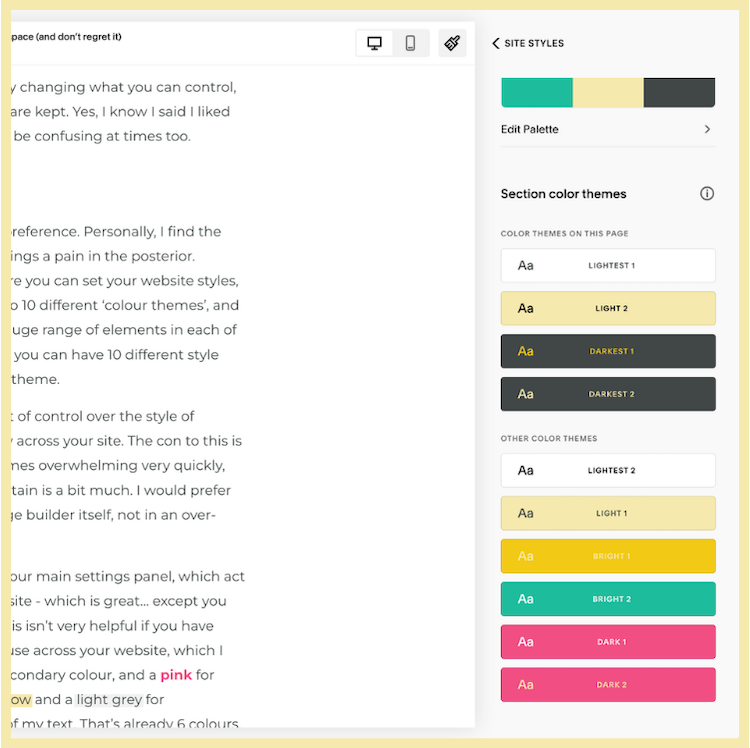
“It takes ages to set up properly, and having 10 different colour themes to maintain is a bit overwhelming”
Limited saved sections
Having a website library where you can save design elements is an absolute must in my opinion. This means having a way to save certain sections or elements you have designed on one page, so that you can quickly and easily load them into other website pages for consistency.
Squarespace does have an option for this (there’s a little heart where you can save a section during editing) but there’s a surprisingly small limit to how many sections you can save. I’ve barely had my website for 6 months, and I’ve already hit my limit and had to go and make space again.
It’s not the end of the world, especially as you can duplicate existing pages to use as a template, but it’s not ideal and I’ve had to do a fair bit of to-ing and-fro-ing between pages to make sure my styling is the same for certain elements between pages. Having design and brand consistency is really important for branding and user experience, so it surprises me that this is so limited in Squarespace.
The simplicity of it
Yes, I know this is on my pro list as well, but the truth is that the simplicity of Squarespace is both a good thing and a bad thing.
There’s no doubt that using the right theme and plugins on Wordpress can afford you significantly more design control within page editing than Squarespace does. I have come up against a lot of things I’ve wanted to make look a certain way, and not been able to without code - for example, adding a border to an image. Sometimes I have resorted to code, and other times I’ve relented to the Squarespace gods and just let it look different to how I initially wanted.
When you use Squarespace, what you design will probably end up with a ‘Squarespace’ look, which is going to be a pro or a con depending on your preference. You can brand and style things to a certain degree, but the fundamental systems and software is restricted. To be fair, the same can be said for any theme you might use on Wordpress. You can usually tell what theme a Wordpress website has been designed on because of the general look and feel as well, so this isn’t solely a Squarespace problem.
One caveat to this which I do have to add, is that there are third party plugins and integrations for Squarespace which you can use to expand your design and function capabilities. I haven’t tried any yet, and so this could be a slightly unfair assessment.
“The one thing about Squarespace which I actively dislike is their email marketing solution. It’s expensive for what you get, and it doesn’t come anywhere close to being as good as other email marketing systems.”
Limited email integration
One issue which almost stopped me switching from Wordpress to Squarespace, was that my email marketing software - Mailerlite - isn’t fully integrated with Squarespace.
On Wordpress (using the Divi theme) I could integrate pretty much any email marketing software under the sun, so I could use the inbuilt Divi sign up forms and add people to whichever mailing list/group I wanted.
On Squarespace, it’s more limited. Mailchimp appears to be the only email marketing software with a proper Squarespace integration, which means utilising workarounds if you use any other software.
I can use Squarespace’s inbuilt newsletter blocks to collect and send email addresses to my Mailerlite mailing list, but I can only connect one mailing list (group) at a time. This makes managing multiple email opt-ins or marketing funnels more complicated, and I have to rely on the code block to embed different sign up forms. Work-able, just not ideal.
Mobile editing
It’s good that you have the ability to edit a mobile version of your website on Squarespace, as I understand that until recently you couldn’t do that at all, but I find Squarespace’s mobile editing limited.
You can move objects around, re-size elements and adjust the spacing to get your page looking good on mobile too, but if you make adjustments to literally anything else then it changes on the desktop version of your website as well as your mobile version. I really hope this changes, and they bring in the ability to change alignment, change text and even delete things on the mobile view without it affecting the desktop version.
On Wordpress (Divi and other themes I’ve used) it was possible to choose to hide or show different elements on mobile and desktop. This is because sometimes what looks good on a desktop design doesn’t look good on mobile - and vice versa. You can of course amend things with a bit of coding if you need to, but I feel you shouldn’t have to resort to coding for something like this, it should be easily available for everyone to control.
Limited overall capabilities
Last but not least, it can’t be ignored that Wordpress has significantly more potential as a website design and development tool than Squarespace does. There’s about 60,000 free plugins for Wordpress alone, and when you add paid plugins in the mix too, you can do pretty much whatever you want to on Wordpress.
Squarespace does seem to have a growing market for plugins, but compared to Wordpress it has more limited overall capabilities. What this really highlights for me is that as with most things, there’s no right or wrong solutions - only the best solution for your needs.
“As with most things, there’s no right or wrong solutions - only the best solution for your needs.”
So was it worth switching from Wordpress to Squarespace?
For me, yes.
So far, I’m really happy I switched, and have no plans to move back to Wordpress. Since switching to Squarespace, I actually feel quite excited about editing and growing my website, when on Wordpress it was starting to feel like a burden.
Whilst the simplicity and limitations of Squarespace can be frustrating at times, on balance I’m happy to live with it in the knowledge that it’s freed up so much of my time and energy. If I come across a design change I really want to implement I can often find a way to make it happen with a bit of coding, and if nothing else I’m more focused on getting content online rather than obsessing about creating a ‘perfectly designed’ webpage.
It took time and a lot of work to switch from Wordpress to Squarespace, but now it’s done I feel I spend a lot less time dealing with compatibility errors, website updates, website speeds, payment fraud and all the other tech headaches, and instead devote that energy to creating new products, offerings and courses. Without a doubt I wouldn’t have started selling cards online if I hadn’t switched to Squarespace.
Would I recommend everyone switched though?
Not necessarily, no. There is definitely nothing wrong with Wordpress.
In some situations, I would still recommend Wordpress over Squarespace. You can do more complex things and it’s arguably still a better developer tool. For a blogging site, Wordpress might have the edge, and the ability to use well developed plugins like Learndash, Memberpress and Events Calendar can allow you to take your website in any direction you want without it looking like a ‘Squarespace website’. Wordpress has the ability to utilise more complex SEO tools, and it can also be used to set up websites that have to follow restrictions to be legally compliant (e.g. certain government or health services).
For complexity, I would argue that Wordpress is still the winner.
But for simplicity and ease for a small or solo business? I feel that Squarespace has the edge at the moment. When you already have to wear all the hats to run your own business, being able to take off the hat that says ‘tech support’ is a massive relief - and that’s coming from a web designer.
After years of being loyal to Wordpress… I’m a Squarespace convert.
Need a hand with your website?
If you need a hand getting your Squarespace website up and running, take a look at my web design service.
Sign up to my email community below to hear about any new services I launch, and special offers I run. You’ll get weekly emails with sparks of joy and creativity, as well as tidbits on running a small, aligned & authentic business online: